Widgetize Anything
As of Wordpress 2.8.2, this plugin no longer works. I recommend switching to use the PHP Code Widget. It's exactly the same as this one, except that it requires you to use tags.
There are many Wordpress plugins that should be converted into sidebar widgets, made compatible with the Automattic Widget Plugin, but, for whatever reason, have not yet been converted. Wouldn't it be nice if there were a generic way to call other plugins from within a sidebar widget? Now there is! Introducing.... Widgetize Anything! Basically, it works just like the built-in text widgets, except that it allows you to put in PHP code into the body of the widget.
Features
- Create any number of Widgetize Anything widgets
- Paste PHP code directly into the widgets in the widget admin
- Built in optional "Title" property.
Requirements
- A WordPress Blog
- Wordpress 2.2 or greater -OR- the Automattic Widget Plugin
Installation
- Download the plugin here: widgetize-anything.tar.gz (2.3 kB)
- Unzip the plugin into your /wp-content/plugins directory.
- Activate the plugin in your WordPress admin.
- Choose how many Widgetize Anything widgets you want under Options --> Widgetize Anything (see screenshots)
- Enter the desired PHP code into the widget on the Sidebar Widgets page in your WordPress admin (see screenshots).
- Drag the widget onto the sidebar where you want it on the Sidebar Widgets page in your WordPress admin.
Screenshots

The options screen
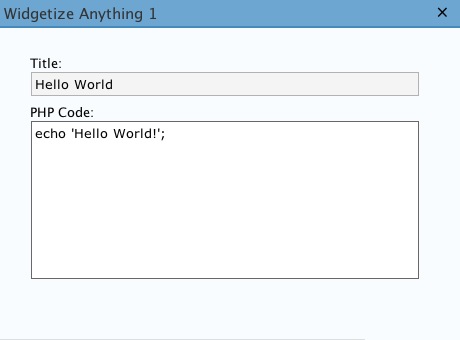
The simplest example: Hello World

Calling the WP-PostRatings plugin to display the highest-rated posts.
Troubleshooting
It's important to understand that the code that you put into your widget must be valid PHP code. You may not open or close PHP blocks with "< ?php" or "?>", nor can you place straight HTML code into the widget content. You have to echo out all the HTML code that you want to show up on your page.
Change History
1.2
2007-06-25
Fixed a bug caused by Wordpress 2.2.1. They changed the way widgets are registered once again.
1.1
2007-05-17
Fixed a bug caused by Wordpress 2.2. For 2.2, they incorporated the sidebar widgets plugin into the main codebase, and a few things changed.
1.0
2006-10-24
Original version
Questions and Comments
You may leave questions and comments on this blog, or email them directly to me at erikwordpressplugins -at- gmail.